
Lesco Online Bill Check by Reference Number & Get Duplicate Lesco Bill february 2026
Check your LESCO electricity bill online instantly using your 14-digit reference number. This page is designed to check, view and download LESCO bill easily and quickly.
Check LESCO Bill Domestic
Check LESCO Industrial Bill
If you’ve lost your LESCO bill or it hasn’t arrived yet, don’t worry. LESCO offers an easy online tool to check your bill. All you need is your 14-digit reference number or 10-digit customer ID and you can see your bill instantly. This is a quick and free way to avoid paying extra late fees.
LESCO online bill check service is perfect if you’ve misplaced your bill or if it didn’t come on time. By entering your reference number or customer ID, you can view your WAPDA electricity bill complete copy and even print or download it. It’s a good idea to save your reference number on your phone for easy access any time.
How to Check Your LESCO Bill Online
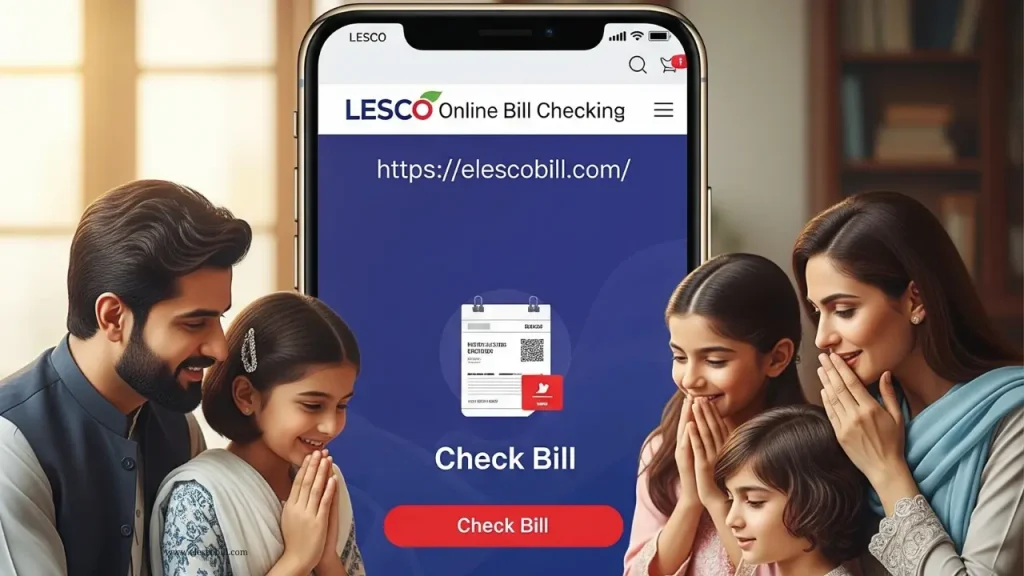
It’s so simple, No need to login or to create any account, just follow these simple steps to check your Lesco electricity bill.
See the video given bellow, you can understand clearly how to check your bill online.
How to find reference number
On Old bill
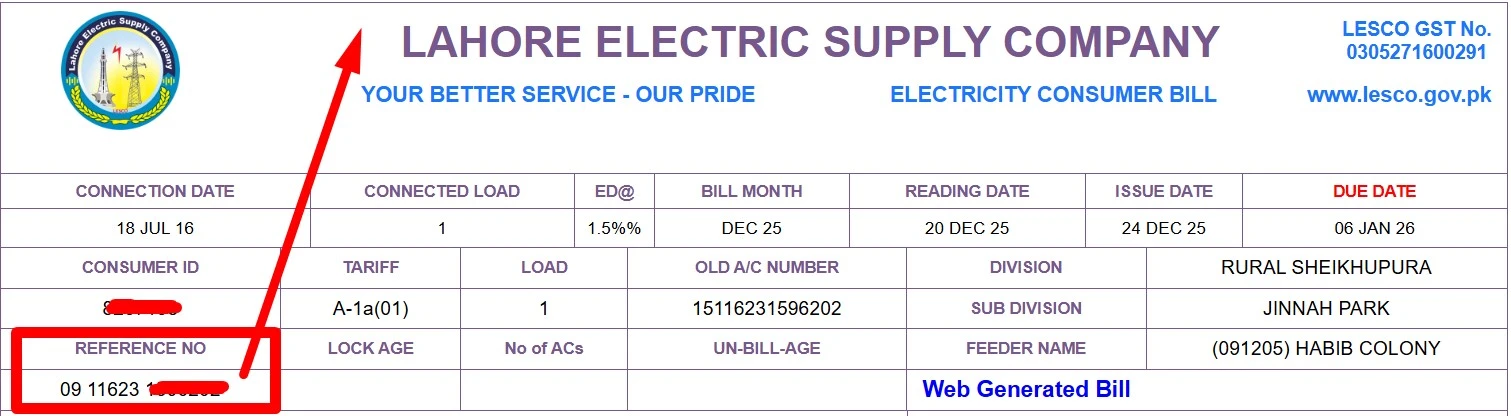
Reference number is a unique 14 digits number given by lesco to its each customer. This number number shows, customer details, feeder, subdivision, division and circle details. It is printed on your lesco wapda electricity bill near your name something like this: 12 34567 8901234 U/R. If you can’t find it on your bill see the image below it is highlighted with rectangle.
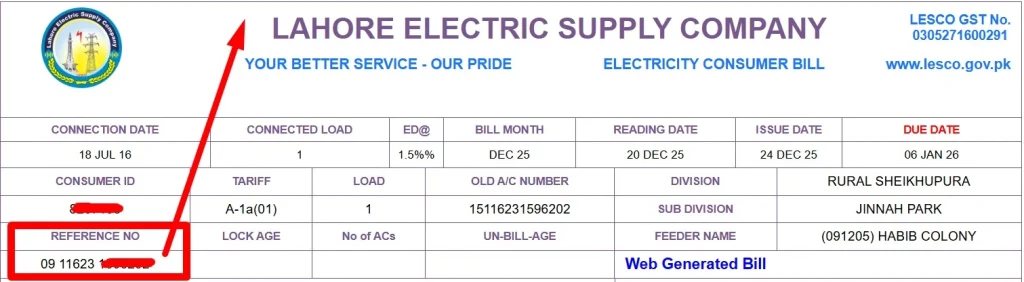
Note: only 14 digits can be used to check or pay your bill last letter U or R not required. They just show wether you are Urban or Rural.
Find by CNIC
If you don’t have your old bill or it is a new connection, don’t worry you can still find your reference number to check and pay your lesco bill. follow these simple steps.
- Go to official lesco website only www.lesco.gov.pk.
- Click on 4th option of CNIC registration.
- Choose search by CNIC.
- Enter your CNIC number in given space.
- You will see their your reference and consumer number just copy from their and use to check your bill.
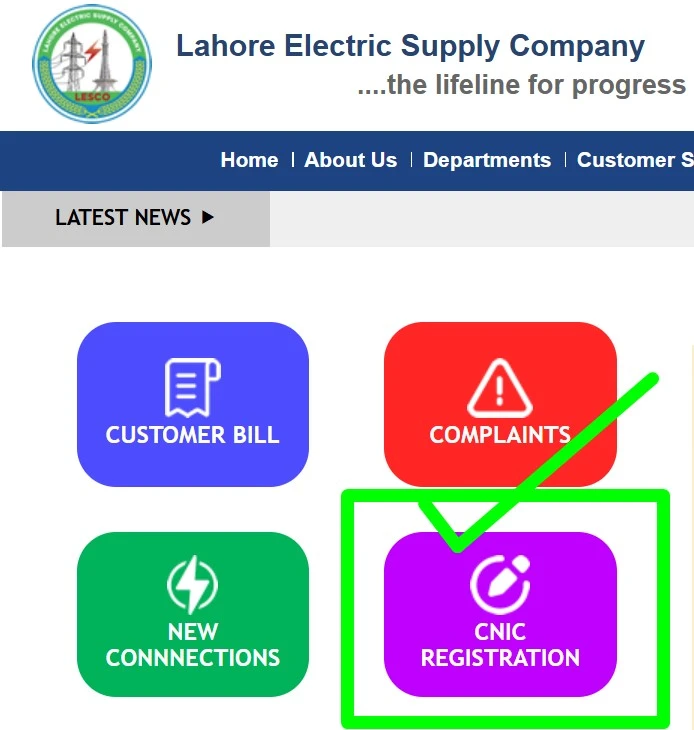
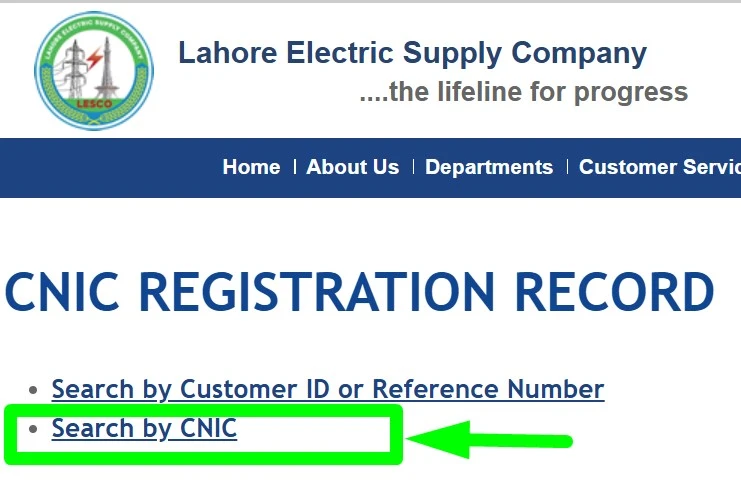
I would like to suggest people who want to check lesco bill by CNIC, should use this method and don’t share personal details to any third party website other then official website of lesco.
LESCO’s SMS and Email Service for Bill Check
LESCO offers a free SMS, Whatsapp and email ebilling service to make bill checking even more convenient. Follow these steps to use this service.
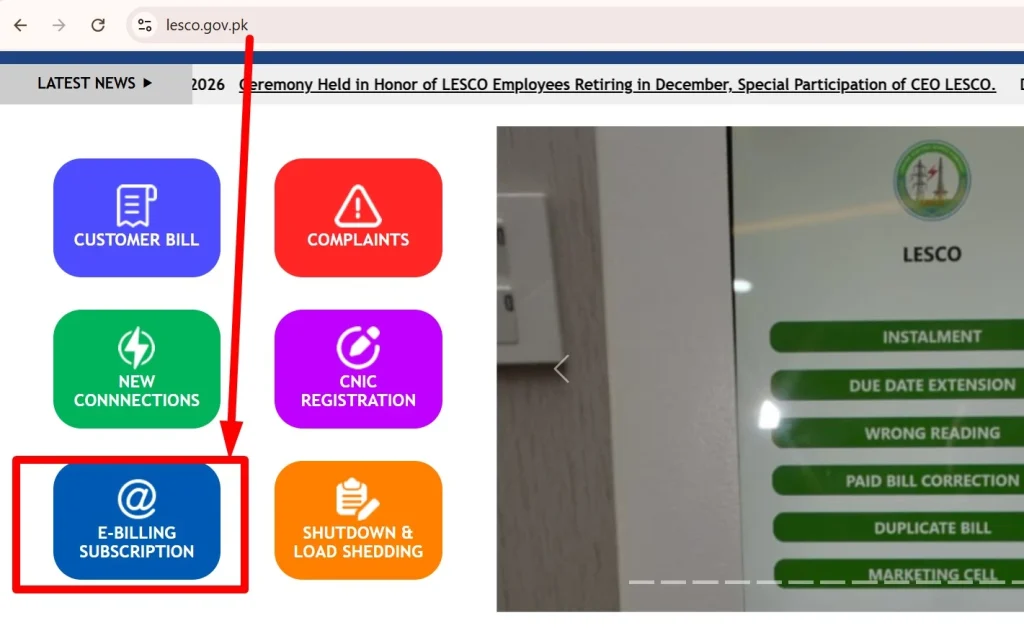 click on ebill registration
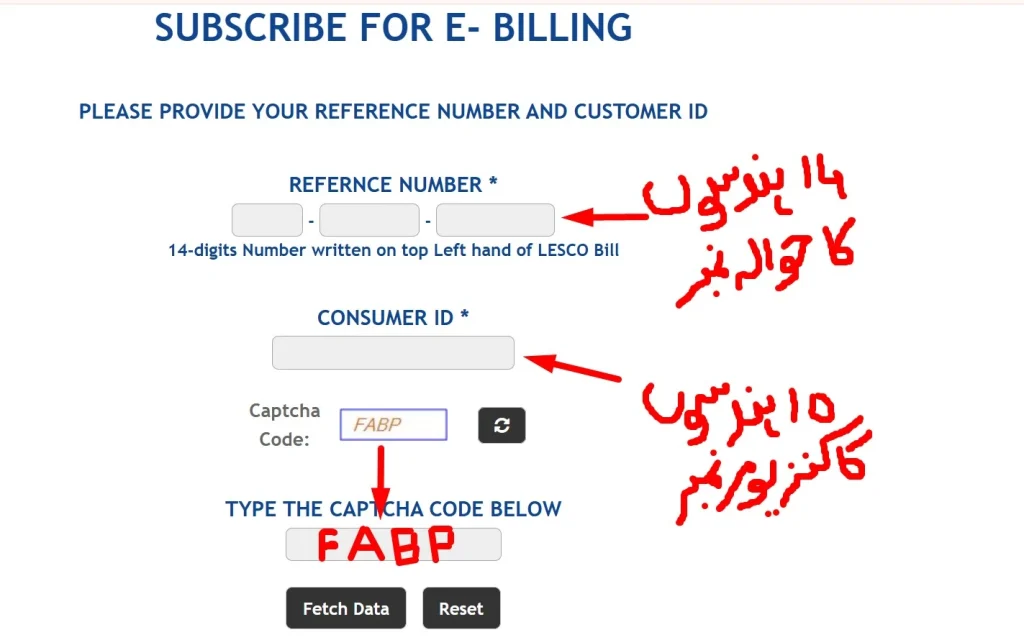 input refrence and consumer number
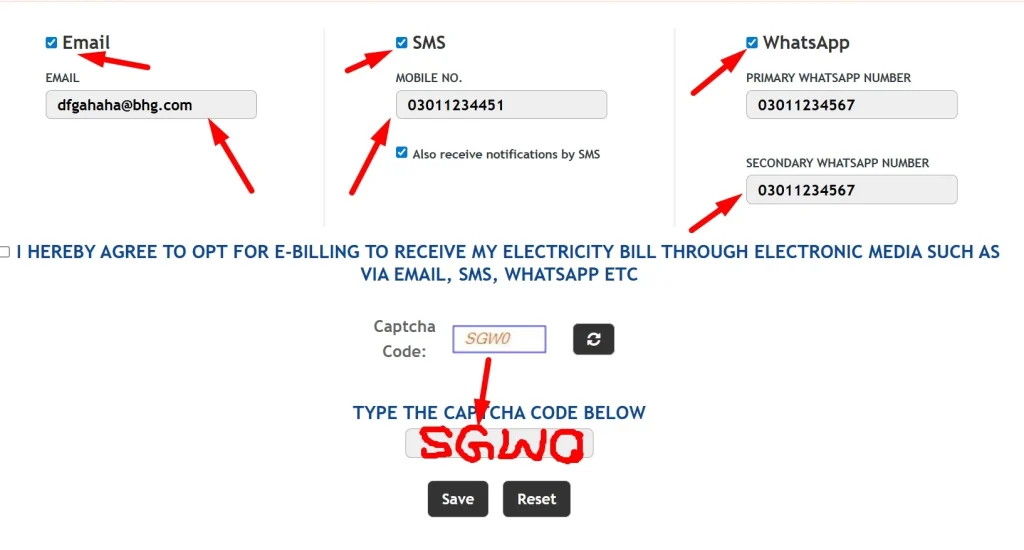 enter number and emaail
How to Download Your Bill In PDF?
Yes, checking your bill is easy, but to download it in pdf can be tricky. Many people don’t know this trick, but it is not too much deficult. When Your bill appear on screen then click on Print → choose save as PDF → click blue download button. For more detail about downloading vist this post [ LINK ].
Understand Your LESCO Bill
Understanding your electricity bill might be confusing, but once you know what to look for at the bill it becomes easy. Your electricity bill shows everything about your electricity usage, charges and taxes. Whether you live in Lahore, Kasur or any other city served by LESCO, learning how to read your bill will help you keep track of your expenses and avoid surprises.
Key Sections of Your Bill
Your LESCO electricity bill is divided into sections to make things easier to understand. Here are the main parts
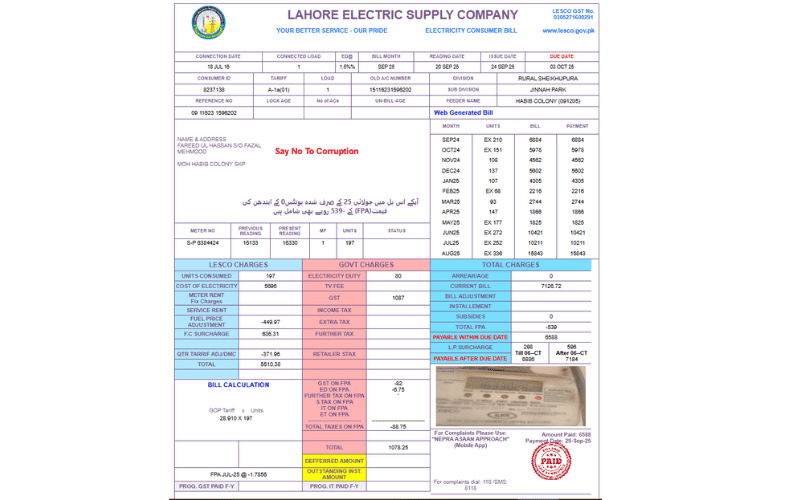
Customer Info
This section has your name, address and account ID. It is given on top left side.
Billing Period
Shows the start and end date for your electricity usage.
Meter Number
Your unique meter ID, which identifies your electricity meter. If you ever change your meter or have any issues with your connection, make sure to keep your meter number handy.
Total Amount Due
This is the total you need to pay for the month, including all charges and taxes.
Payment Due Date
This is the last date to pay bill, make sure to pay by this date to avoid late fees.
Previous Months Reading
It shows the totall used units tell previous month, this is used to calculate your crunt month used units.
Present Reading
It shows the totall used units tell reading date, to calculate crunt month units pravious month reading is subtracted from this present reading. Caculate your unit and if you see major difference contact LESCO right away.
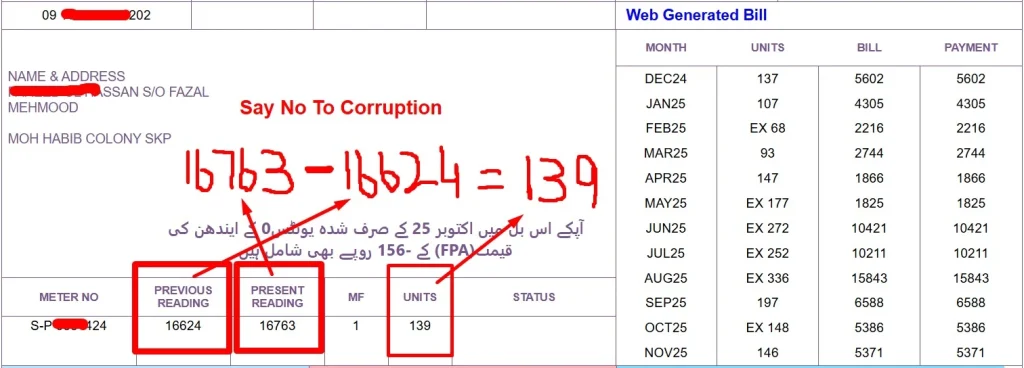
Status
It shows the condition of your meter, if it is faulty or not, sometimes you can see Pro-Rata consumption is this section which means your meter reading was not taken in 30 days and formulla of pro-rata is used to calculate your units. You can see outstanding units or negative units in this section which will be adjusted in next month bill.
Breakdown Charges, Taxes and Payment
The billing details are clearly shown in your bill
Charges
This includes the cost of electricity, meter rent and extra charges like fuel price adjustment (FPA) service rent etc.
Taxes
In this section you can see surcharges from the government (like GST, income tax and TV fees).
Total Charges
This is the final amount you owe, including any arrears, taxes and adjustments.
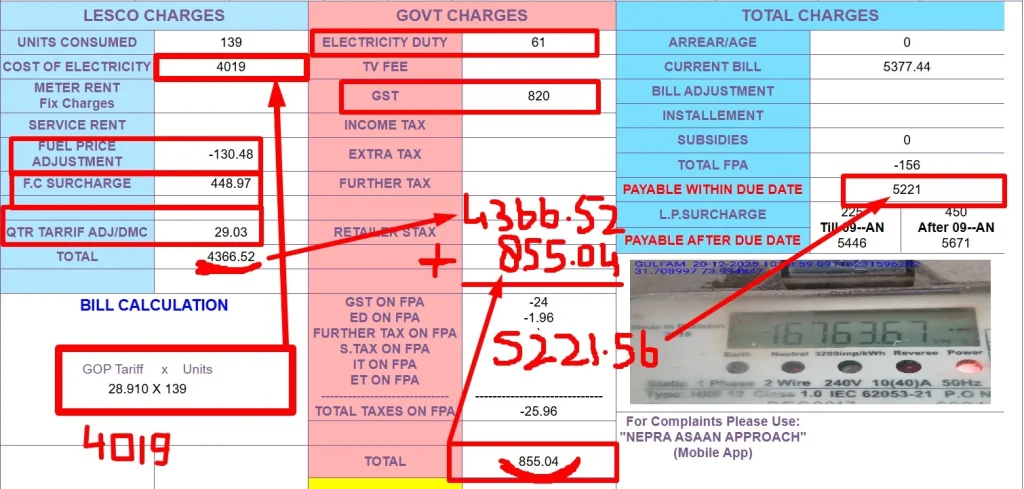
Always keep an eye on these details, as small errors can sometimes lead to higher charges.
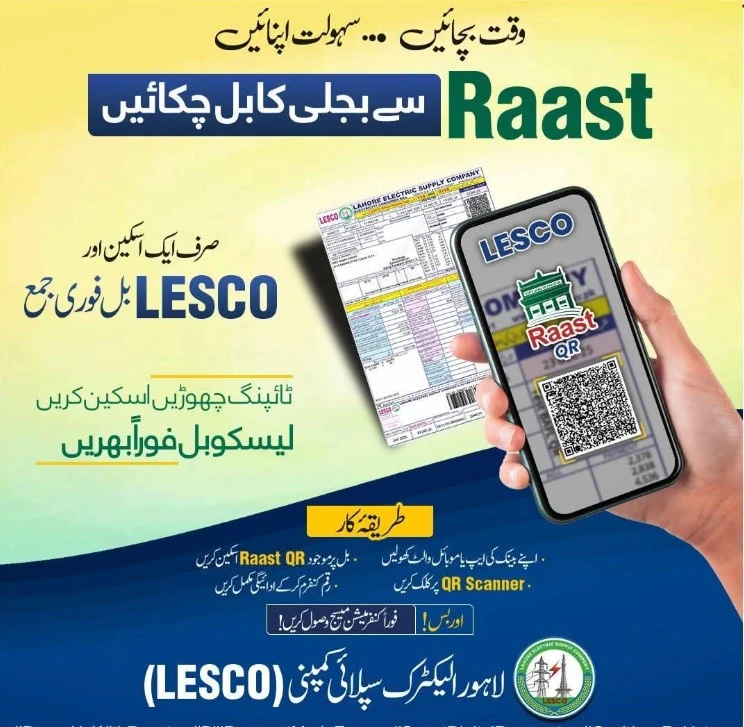
Raast QR
LESCO recently added a raast QR scanner code to make it easy for customer to pay bill. You can scane this QR code on your digital wallet or bank apps to pay your bill. Here you can see how to pay bill by qr code.
LESCO Bill Payment Options
There are multiple ways to pay your electricity bill, both online and offline, depending on what’s most convenient for you. From using bank apps to visiting ATMs or post offices, LESCO offers flexibility in how you settle your electricity charges.
Online methods
Paying your bill online is quick and easy. You can do it through various methods such as bank apps, digital wallets and even online banking portals. Here’s how you can go about it!
Remember you can only pay online with in due date after due date you need to pay offline because online methods does not work and you can lost your money.
- Via Bank Apps
- Through Digital Wallets
- Via Online Banking
- Using Payment Services (PayPak, etc.)
|
Method |
Steps |
|---|---|
|
Digital Wallets (JazzCash, EasyPaisa) |
Open app → Bill Payment → Electricity Bill → LESCO → enter reference number or scan QR/barcode → confirm with MPIN. |
|
Raast QR |
Open wallet app → scan Raast QR from bill → confirm → bill paid. |
|
Bank Apps / Online Banking |
Open bank app or online banking → Bill Payment → LESCO → enter reference number → confirm payment. |
|
Payment Services (PayPak, etc.) |
Select bill payment → choose LESCO → enter reference number → pay securely. |
|
ATMs |
Use selected bank ATM → Bill Payment → enter bill details → pay and collect receipt. |
|
Customer Service Centers |
Visit LESCO service center → pay by cash, cheque, or card → get confirmation. |
Lesco’s Offline Bill Payment Options
If you feel unsecure to pay your bill online or you have not paid bill in given due date don’t worry lesco also offers ofline bill payment options. Following are real experienced based some offline bill payment ways you can chose any one of these.
|
Method |
Steps |
|---|---|
|
Bank branch like (HBL, UBL, MCB, National Bank etc.) |
Visit any bank branch → go to casheir counter → give him your bill copy and cash → Thats it, he/she will transfer cash & give you back your bill copy with paid stemp. |
|
Pakistan post office |
Visit Pakistan post office → go to cashier → give him bill and amount → he will transfer your money to lesco and give you back bill with paid stemp. |
|
Retailer shop (JazzCash / EasyPaisa) |
Visit retailer shop → ask shopkeper to pay your bill → he will pay it online through any online platform → will give you back bill copy with paid stemp. |
Can not pay your bill in one go? don’t worry Lesco offers installment and due date extension. Visit here and learn how to get installment option and due date extension.
What is Lesco?
Lesco stands for Lahore Electric Supply Company, it is a power distribution company that provides electricity to the city of Lahore and surrounding areas. Established in 1998, it is responsible for supplying electricity to over 6.4 million consumers in a region covering more than 16,000+ square kilometers. It is handeling 120+ grid stations, 2150+ feeders, 48000+ km HT & LT lines with 19500+ employees.
Functions and Responsibilities of LESCO
Electricity Distribution
LESCO is responsible for distributing electricity to all areas within its coverage zone, ensuring power reaches both urban and rural locations. It manages over 48,000 kilometers of power lines.
Billing and Customer Service
LESCO generates and sends monthly bills to its consumers. It also offers online services to check bills and track usage. A transparent billing system is maintained, with services such as SMS notifications and online customer support.
Infrastructure Maintenance
LESCO regularly inspects and maintains its infrastructure to ensure uninterrupted service. Emergency response teams are deployed for rapid repairs, especially during high-risk seasons like the monsoon.
Power Theft Prevention
The company actively fights electricity theft through surprise inspections, and imposes fines or legal actions against violators.
Research and Development
LESCO invests in continuous improvements, introducing new technologies like SMS alerts and online bill payments to enhance customer experience.
Overview of LESCO’s Coverage and Regions
LESCO serves a broad geographical area in Punjab, covering both urban and rural districts. Below is a list of areas under its jurisdiction:
| Districts Served |
| Lahore |
| Okara |
| Sheikhupura |
| Nankana |
| Kasur |
LESCO’s Operational Circles
The company is divided into several operational circles to manage its wide service area. Each circle consists of multiple divisions and sub-divisions:
|
Circle No. |
Circle Name |
Divisions |
Subdivisions |
|---|---|---|---|
|
1 |
North Lahore Circle |
5 |
28 |
|
2 |
Central Lahore Circle |
5 |
31 |
|
3 |
Eastern Lahore Circle |
4 |
23 |
|
4 |
Okara Circle |
4 |
23 |
|
5 |
South-Eastern Lahore Circle |
4 |
26 |
|
6 |
Sheikhupura Circle |
4 |
18 |
|
7 |
Kasur Circle |
5 |
30 |
|
8 |
Nankana Circle |
4 |
16 |
These circles help in managing the distribution network effectively, ensuring that electricity is supplied consistently across different regions.
LESCO Customer Service and Support
How to Contact LESCO for Assistance
You can contact LESCO for help through the following numbers:
- Helpline 118
- Complaint Number: 042-99205461-62
- SMS complaint registration number 8118
Registering Complaints and Issues with LESCO
To report issues like outages or billing problems, you can call the helpline or submit complaints online through their website. These channels ensure quick resolution of problems.
LESCO’s Online Customer Support Services
LESCO offers several online services, including Paperless billing and online payments. For more details visit lesco helpline
A feedback portal for suggestions
These services make it easy for customers to manage their accounts and get support without needing to visit LESCO offices.
How peak and off-peak hours effect your bill
LESCO also has peak and off-peak hour timings, which play a significant role in determining the cost of your electricity usage. During peak hours, electricity rates are higher due to increased demand, while off-peak hours offer lower rates to encourage energy saving. Here’s how these hours are structured:
Peak and Off-Peak hours
|
Season |
Peak Timing |
|---|---|
|
December to February |
5:00 PM – 9:00 PM |
|
March to May |
6:00 PM – 10:00 PM |
|
June to August |
7:00 PM – 11:00 PM |
|
September to November |
6:00 PM – 10:00 PM |
Using electricity during off-peak hours helps you reduce your bill significantly. It’s important to adjust your usage habits based on these times to save on your monthly charges.
Common Questions (FAQs)
The days of waiting for the postman have gone. With elescobill.com now LESCO online bill checking is easy. All you need is your reference number and you’ll get the complete bill online.
I have collected all this information through detailed research and consulted with engineer Amanullah Sheikh Xen LESCO to make sure all the technical details are correct. So you can use this tool hassle free. The solution is in your hands.
About This LESCO Bill Check Page
This page is maintained by a Pakistan-based utility billing platform.
Bill data is fetched from official PITC / LESCO sources.
We do not store reference numbers or personal data.
Last updated 09-feb-2026
Disclaimer
This information is provided for general guidance only and is based on research and consultation with a LESCO engineer to ensure accuracy. We are not affiliated with LESCO or any government authority; all services are informational. For official confirmation, billing issues or disputes, always contact LESCO directly through their official channels.
Related Utility Updates
Below are some optional utility updates for users who want more information.
Important update for LESCO pensioners regarding recent payment issues.
👉 Read full details here
Safety guidelines for kite flying to avoid electricity-related accidents.
👉 Read full details here
Check feeder-wise load shedding updates using your reference number.
👉 Read full details here
Latest electricity unit rates, slabs and charges explained simply.
👉 Read full details here
Practical tips to lower your monthly electricity bill legally.
👉 Read full details here
The federal government has proposed lowering electricity prices and revising fixed charges for households, businesses, and industries, with NEPRA set to review the plan on 10 February.
👉 Read full details here
NEPRA has replaced net metering with net billing in Pakistan – here’s what the new solar rules mean for your savings and future plans.